
Data classification labels are coming to the U’s Google Workspace
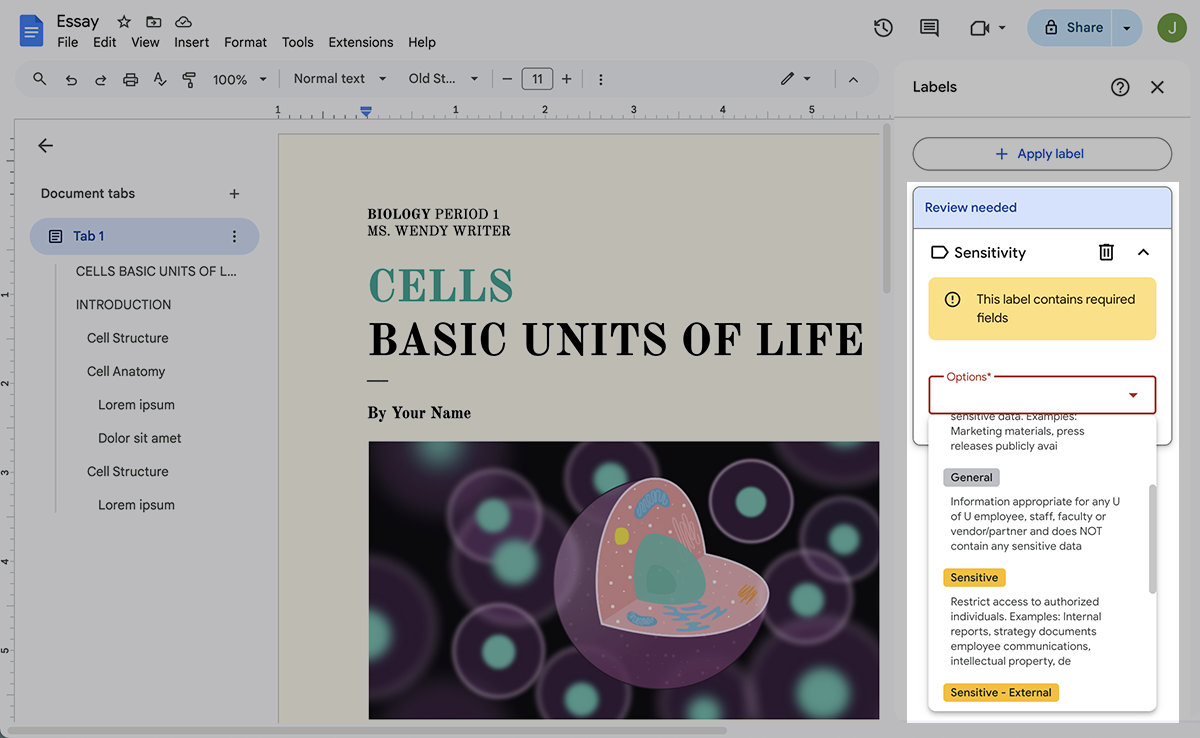
To help members of the University of Utah and University of Utah Health communities better understand and manage the sensitivity of documents in the U’s instance of Google Workspace, the Unified Communications team in the U’s Chief Technology Officer (CTO) organization and Information Security Office (ISO) are preparing to roll out data classification labels.
“This added functionality allows Google Workspace users to label documents and emails according to specific data classification categories,” said James Rice, associate director for Unified Communications. “These labels serve several important purposes: they help users filter, organize, and retrieve emails and documents; they give viewers an immediate understanding of the information’s sensitivity; and they help protect sensitive information from unauthorized access and potential data breaches.”
Data classification labels are metadata tags — Personal, Public, General, Sensitive, Sensitive–External, and Restricted — that users can apply to files in Google Drive (including Docs, Sheets, Slides, PDFs, and other supported file types).
“These metadata labels are more than simple tags; they are structured information applied to each file,” said Vijay Kammili, senior IT product manager for CTO Platform Services. “They empower Google Workspace users to clearly identify data sensitivity, while enabling administrators to apply appropriate data protection policies.”
Currently in a pilot phase, data classification labels support Policy 4-004: University of Utah Information Security Policy and Rule R4-004C: Data Classification and Encryption by:
- Promoting consistent data classification
- Reducing accidental over‑sharing
- Enabling enforcement through Google Workspace IT security controls, such as data loss prevention (DLP), audit logging, and retention policies
While similar to Microsoft sensitivity labels, recently deployed university-wide, Google Workspace data classification labels are not a form of file-level encryption. Instead, protections rely on Google Drive permissions, DLP rules, and administrative enforcement.
“Classification labels do not replace Google Drive permissions,” Rice said. “They provide additional context and policy signals that IT security and compliance controls can use.”
Users may apply classification labels to:
- Identify data sensitivity and handling requirements
- Trigger or support DLP rules
- Restrict or monitor external sharing based on classification
- Improve search, reporting, and auditability of data
“This is another way UIT is working to strengthen information security across the university while minimizing disruption to existing workflows,” Kammili said.
For more information, including instructions on applying data classification labels, label use cases, sharing guidance, and troubleshooting help, please access this IT Knowledge Base article.
Node 4
Our monthly newsletter includes news from UIT and other campus/ University of Utah Health IT organizations, features about UIT employees, IT governance news, and various announcements and updates.