
Coming soon: Microsoft sensitivity labels, a new tool to help protect university data
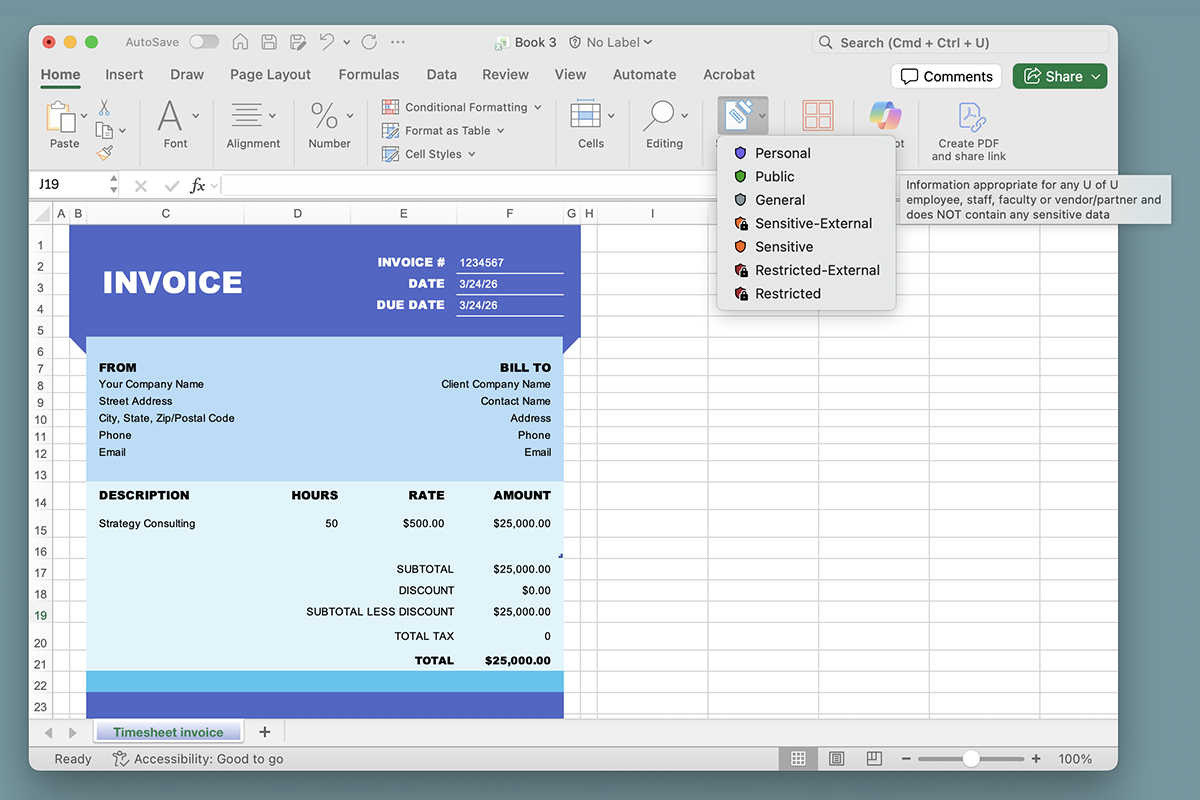
To strengthen the protection of university information and make responsible data handling easier, the Unified Communications team in UIT’s Chief Technology Officer (CTO) organization and Information Security Office (ISO) are preparing to roll out Microsoft 365 (M365) sensitivity labels across the University of Utah and University of Utah Health.
How the labels work
Sensitivity labels help organize, classify, and protect data by restricting access and encrypting applicable files to prevent unauthorized use.
Users can apply them to:
- Encrypt data to block unauthorized parties
- Set permissions for access and editing
- Restrict file access after a set period of time
- Require passwords for documents, even if used outside of the university
Currently in a pilot phase, the new feature will help students, faculty, and staff classify and safeguard documents and emails with greater consistency and less effort.
Every file contains a different type of information. Some files are meant to be public; others hold sensitive details or content intended only to be shared internally to the U. M365 sensitivity labels help ensure each file gets the right level of protection — no more, no less.
Using sensitivity labels, users can “work securely while maintaining efficient collaboration,” said Vijay Kammili, senior IT product manager for CTO Platform Services.
James Rice, associate director for CTO Unified Communications, agreed, adding, “By asking users to select data classification levels, we want to ensure that privacy is respected and, importantly, policies and regulations are followed.”
During the current pilot phase, Kammili said the focus is on awareness and user education. When the pilot wraps up and the labels are made available for general use, he said a “Sensitivity” dropdown will appear in Microsoft apps. Users can choose from several options (i.e., “public,” “general,” “sensitive,” or “restricted”), depending on what the document contains.
“The idea is to help support university activity, not impede it. This is about the right IT security at the right time,” said Trevor Long, director for ISO’s Governance, Risk & Compliance (GRC) team. “The goal isn’t to interrupt activity or make work harder, it’s to ensure appropriate safeguards without unnecessary roadblocks. If a document doesn’t need strong protection, it won’t receive it automatically.”
Sensitivity labels protect university information by classifying and safeguarding files stored in OneDrive, SharePoint, Teams, and other M365 applications. In the initial phase, M365 users will manually apply the labels, which indicate how sensitive the content is, and the right level of protection, which, depending on the label, may include encryption, access restrictions, and limits on sharing.
“[Sensitivity] labels help guide good habits. They reinforce thoughtful data stewardship and make it easier to comply with university policy ...”
– Ryan Terry, information security engineer, Information Security Office
“Labels help guide good habits,” said Ryan Terry, information security engineer for the ISO’s Security Engineering team. “They reinforce thoughtful data stewardship and make it easier to comply with university policy without needing to memorize specifics.”
In addition to supporting obligations described in Policy 4004 and Rule R4004G, which require that institutional data be classified and protected, sensitivity labels also respond to complexities around artificial intelligence (AI) and anticipate possible future AI-driven workflows. Specifically, Terry said sensitivity labels add IT security protections to Microsoft Copilot, one of two generative AI tools approved for use at the U (ChatGPT is the other). If a Copilot user tries to upload a file labeled as “restricted,” Terry said the tool will not read it because Copilot honors sensitivity labels to help keep protected data secure.
Some labels include stronger built-in protections. For example, Terry said documents labeled “Restricted” are automatically encrypted. Only users explicitly authorized by the document’s creator will be able to open them — even if the file is forwarded. Labels are “persistent,” meaning they stay with the file no matter where it goes. Even if a document is downloaded or shared outside the university or the Microsoft ecosystem, its label and protections remain.
“This helps prevent accidental exposure of sensitive data,” Terry said.
Once sensitivity labels are released university wide, Terry said users will also see “policy tips” pop up when Microsoft detects information that looks like sensitive data (such as medical record numbers).
“These gentle reminders will help people confirm whether the document needs a higher level of protection,” he said.
A second phase coming at a later date will result in a default “sensitive” label being applied to all previously unlabeled documents. Additional communications will be sent in advance of that change.
“What really matters at this point is that we’re putting a system in place that lays an important foundation for future data protection work at the university,” Terry said. “As we adopt more tools — including AI-powered features — sensitivity labels will help ensure confidential information stays secure.”
For more information, including label types and instructions on how to apply labels, please visit this IT Knowledge Base article (login required).
Node 4
Our monthly newsletter includes news from UIT and other campus/ University of Utah Health IT organizations, features about UIT employees, IT governance news, and various announcements and updates.